


Description
Product Overview
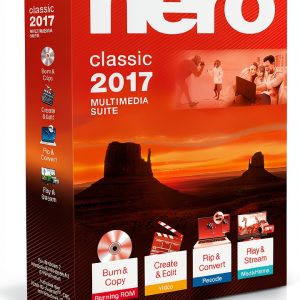
MAGIX Photo Designer is a comprehensive graphic design and image editing software released on March 23, 2020 by the reputable manufacturer MAGIX. Built for professionals and enthusiasts alike, the application combines powerful layout tools, vector illustration capabilities, and advanced photo manipulation features in a single, user‑friendly interface. The software supports custom object embedding, allowing users to import 3D models, icons, and other assets directly into their designs, while the paragraph designer and tab leader functions give precise control over text flow and alignment. With a best‑seller rank of #1,105 in Software and #62 in Photography, the program has proven its popularity among creative communities. It runs on Windows operating systems, requires a modest hardware configuration, and integrates seamlessly with popular file formats such as PSD, JPEG, PNG, and SVG. The intuitive workspace is organized into panels for layers, properties, and asset libraries, enabling rapid prototyping and efficient workflow management. Whether you are creating marketing collateral, social media graphics, or detailed illustrations, MAGIX Photo Designer provides the tools needed to achieve professional results without the steep learning curve of more complex suites.
![[Product front view showing all components]](https://www.olympusgo.store/wp-content/uploads/2026/06/76f2876a1c81446c9b5c53655f95b545.jpg)
Usage
Designed for a wide range of creative scenarios, MAGIX Photo Designer excels in both studio and on‑the‑go environments. Graphic designers can develop brand identities, logos, and promotional materials using the vector drawing tools and custom object embedding to incorporate unique visual elements. Photographers benefit from the integrated image editing suite, which offers non‑destructive adjustments, layer‑based retouching, and batch processing for large collections. Marketing teams can quickly assemble newsletters, flyers, and web banners by leveraging the paragraph designer to maintain consistent typography across multiple pages. Educators and students find the software valuable for classroom projects, as the intuitive interface encourages experimentation with layout composition and illustration techniques. The program also supports collaboration through shared asset libraries, allowing multiple users to access and edit the same design files, which is especially useful for remote teams and agencies. In addition, the software’s export options include high‑resolution PDFs for print, optimized JPEGs for web, and SVG files for scalable graphics, ensuring that final outputs meet the specific requirements of any distribution channel.
Why Choose Us
Choosing MAGIX Photo Designer means investing in a solution that balances performance, flexibility, and support. The software is backed by MAGIX’s decades of experience in multimedia development, guaranteeing regular updates, bug fixes, and feature enhancements that keep the product aligned with industry standards. Quality assurance processes include rigorous testing across diverse hardware configurations, ensuring stability and reliability even when handling complex, multi‑layered projects. The custom object embedding feature sets the application apart from competitors by allowing designers to work with 3D assets without leaving the program, reducing the need for additional plugins or external tools. Customer support is available through a dedicated help center, live chat, and community forums where users can share tips, tutorials, and templates. Moreover, the licensing model includes a one‑year free upgrade, giving users access to the latest version without additional cost. The software’s documentation is comprehensive, featuring step‑by‑step guides, video tutorials, and a searchable knowledge base that empowers users to master advanced techniques at their own pace. By choosing MAGIX Photo Designer, you gain a reliable, future‑proof platform that grows with your creative ambitions.
Key Features
- Custom object embedding lets you import and manipulate 3D models, icons, and vector assets directly within your design canvas, saving time and simplifying workflow.
- Paragraph designer and tab leader tools provide precise control over text alignment, spacing, and flow, ensuring professional‑grade typography.
- Integrated image editing suite offers non‑destructive adjustments, layer‑based retouching, and batch processing for efficient photo enhancement.
- Extensive export options include high‑resolution PDF, web‑optimized JPEG, PNG, and scalable SVG, catering to print and digital distribution needs.
- Dedicated customer support with live chat, comprehensive documentation, and regular free upgrades ensures a smooth, future‑ready experience.
FAQ
What operating systems does MAGIX Photo Designer support?
MAGIX Photo Designer runs on Windows 10 and later versions. The software is optimized for both 64‑bit and 32‑bit architectures, providing smooth performance on a wide range of hardware configurations. While a Mac version is not currently available, users can run the program on macOS using virtualization tools or Boot Camp if needed.
Can I import and edit PSD files directly?
Yes, MAGIX Photo Designer fully supports Adobe Photoshop PSD files. You can open layered PSD documents, edit individual layers, apply adjustments, and preserve layer masks and blending modes. This compatibility allows seamless collaboration with Photoshop users and simplifies the transition between the two applications.
Is there a trial version available?
MAGIX offers a 30‑day free trial of Photo Designer, giving you full access to all features, including custom object embedding and the paragraph designer. The trial period allows you to evaluate the software’s capabilities in real‑world projects before committing to a purchase.
How does the licensing and upgrade policy work?
When you purchase MAGIX Photo Designer, you receive a perpetual license for the current major version along with one year of free upgrades. After the first year, you can continue using the version you own or opt into a discounted upgrade plan to receive future major releases and new features as they become available.
What kind of customer support can I expect?
Customers have access to a multi‑channel support system that includes a searchable knowledge base, video tutorials, community forums, and live chat with technical specialists. Additionally, MAGIX provides regular webinars and workshops to help users master advanced techniques and stay up‑to‑date with new functionalities.













































Reviews
There are no reviews yet.